Ask for photos by link, get photos you can trust
Send one link. Your customer takes the photos in their phone browser with nothing to install, and Rial verifies and certifies each photo at the moment of capture.
By Tiago Palladino, Rial · Updated October 2026Open it on your phone now
The fastest way to see what your customer sees is to do it. Scan the code with your phone camera, or tap the button on mobile. No form and no sales call.

The demo opens the same capture flow your customers would see.
Try RialFour steps, nothing to install
- 01
Create the request
From the dashboard, the API, the CLI or an AI agent. Say which photos you need, what each one must show and, if it matters, where they must be taken.
- 02
Send the link
Through the channel you already use with the customer. One link per customer, or one permanent link for everyone.
- 03
The customer takes the photos
The link opens in their phone browser and guides them step by step. Nothing to install, no account, done in a few minutes.
- 04
You get a verdict
Each photo comes back Rial or Not Rial, with the checks that tripped, the object and condition results, and a C2PA credential.
Why not just ask for photos by email
A photo sent by email or chat can be old, downloaded from the internet, edited, generated with AI, or a picture of a screen. Once it arrives, all you have is the file, and file metadata can be rewritten in seconds.
A photo taken through the link is captured live. The device, the location and the time are recorded as it is taken, and the photo is checked for AI generation and for recapture of a screen before it reaches you.
A real result
We asked for a photo of an air conditioner in our office, with the expected address and the condition of the wall. This is what came back from the live capture.
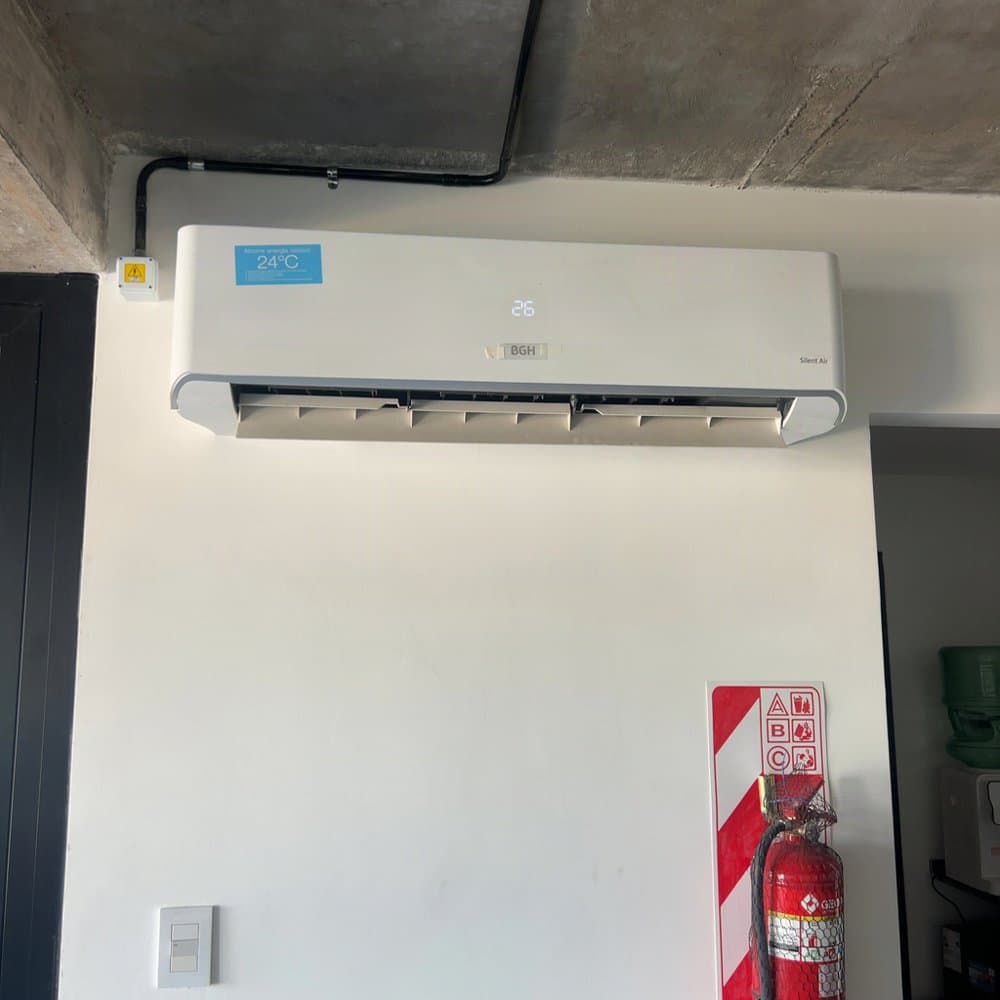
Real photo
Object: match, expected “air conditioner”
Condition of the wall: good, 9.5 out of 10
On location: 8 m from the expected address
Ask for exactly the photos you need
Steps
Front of the car, odometer, serial plate, the damaged ceiling: each step has its own instruction for the customer.
Expected object
Say what each photo must show. A photo of something else comes back as a mismatch.
Condition
List what to assess, such as paint, bumper or water stains, and each one is scored from 0 to 10 with a reason.
Expected location
Send an address and Rial checks the photo was taken there.
Live only or uploads
Choose whether the customer can upload from the gallery.
Link duration
One week by default, adjustable per request.
One link for everyone, or one per customer
Publish a template once and you get a permanent link anyone can open, each person with their own verification. Or mint a single-use link per claim or order from the same template, with your own reference attached. You can also create requests in bulk from a CSV file or a Google Sheet.
Common uses
Insurance claims and inspections
Damage photos for a claim, or a self-inspection before a policy starts.
Delivery and refunds
Proof of delivery, or photos of a damaged order before a refund.
Rentals and fleets
Condition of a car or an apartment at check-in and check-out.
Marketplaces
Proof that a seller has the item, as it is today.
When to use the native SDKs instead
The link carries device attestation and a C2PA credential, and reaches any customer without an install. If you have your own app, the iOS and Android SDKs go further: they sign each photo with the phone’s secure hardware and work offline. Access within 24 hours of a request to developers@rial.io.
What it costs
The first 5 photos are free. After that, packs of 50, 250 or 1000 photos cost US$10, US$50 or US$200, with no monthly minimum.
Common questions
Does my customer need to download an app?
No. The link opens in the phone browser, with no app and no account.
How do I know the photo was taken there and then?
Each photo is captured live through the link, with its location and time recorded at capture. If you send an expected address, Rial checks the photo was taken there and returns the distance in meters.
What if the customer photographs a picture on another screen?
Every photo is checked for recapture. A photo of a screen comes back Not Rial, with the signal screen_detected.
Can the customer upload an old photo from their gallery?
Only if you allow it. When you create the request you choose live capture only, or capture plus uploads. Uploaded photos get the same checks, without the guarantees of a live capture.
How long does the link stay valid?
One week by default. You can set a shorter or longer window for each request.
Who sends the link?
You do, through your own SMS, email, WhatsApp or claims system. Rial gives you the link; it does not message your customers.
How do I get the results into my system?
In the dashboard, through the API, or by webhook: pass a webhook_url and Rial posts verification.completed when the photos are in.