AI-generated and edited claim photos
What to check in the photos you already have, and how to verify and certify the next ones at the moment of capture.
By Tiago Palladino, Rial · Updated October 2026What is reaching claim files
Fully AI-generated
A scene that never existed: a dented door, a flooded kitchen, a broken screen, produced from a text prompt.
Real photo, added damage
A genuine photo of the car or the room, edited to add or enlarge the damage. Often called a shallowfake.
Reused from somewhere else
A photo taken from stock libraries, social media or an earlier claim, sent as if it were new.
Photo of a screen
A real camera pointed at a screen that shows a fake or borrowed image. The file looks like a fresh capture.
Carriers report the shift directly. Allianz UK recorded a 300% rise between 2022 and 2023 in cases where apps were used to distort real images, videos and documents. Aviva detected over 18,400 suspect claims worth £233M in 2025, with a growing number supported by AI-generated images, particularly in motor.
How big the problem is
of US consumers would consider digitally altering a claim image or document.
Verisk, March 2026of carriers have encountered AI-manipulated claim documentation.
Verisk, March 2026of claims professionals feel very confident detecting deepfakes, against 58% for edits to real photos.
Verisk, March 2026of anti-fraud professionals say their organization is more than moderately prepared for AI fraud.
ACFE and SAS, May 2026Metadata and a careful look stop being enough
File metadata can be stripped or rewritten in seconds, so a date or a GPS tag inside a photo proves little on its own. Adjusters catch obvious edits, but a well-made generated image or a small edit to a real photo looks normal at claim speed.
Detection tools help, and they return a probability, not an answer. As generators improve, the signal they look for gets weaker. That is why it helps to separate two jobs.
Check what you have, verify what comes next
| Method | Photo already in the file | New photo | What it cannot tell you |
|---|---|---|---|
| Manual review | Yes | Yes | Small edits and good generated images, at volume |
| Detection after upload | Yes, as a probability | Yes, as a probability | Where and when the photo was taken |
| Capture at the source | No | Yes, verified and certified | Anything about photos taken outside the flow |
Rial covers both jobs: Audit for the photos already in the file, and the capture link for every photo that comes next.
Checking a photo that is already in the file
Rial Audit checks a photo you already have. It returns the probability that the image was generated or retouched with AI, with the evidence behind the score, and searches stock libraries and social platforms for matches. It runs in the background and returns a report per photo.
An audit cannot prove where or when a photo was taken. For that, the photo has to be captured through a verified flow.
One wall, two photos, two results
We photographed an air conditioner in our own office through a Rial capture link. Then we took that photo, added water stains down the wall with an AI editing tool, and sent the edited version through Audit, the way a claimant would send it by email. This is what Rial returned for each one.
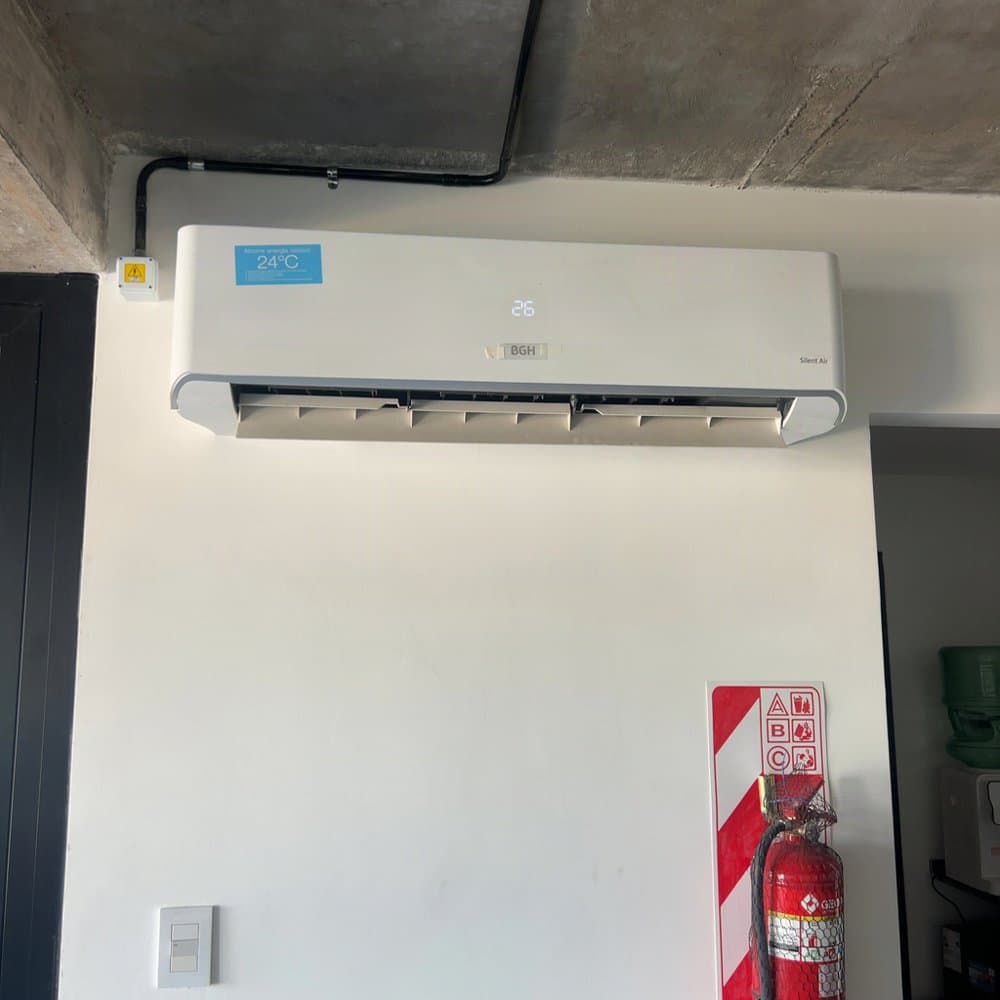
Real photo
Object: match, expected “air conditioner”
Condition of the wall: good, 9.5 out of 10
On location: 8 m from the expected address
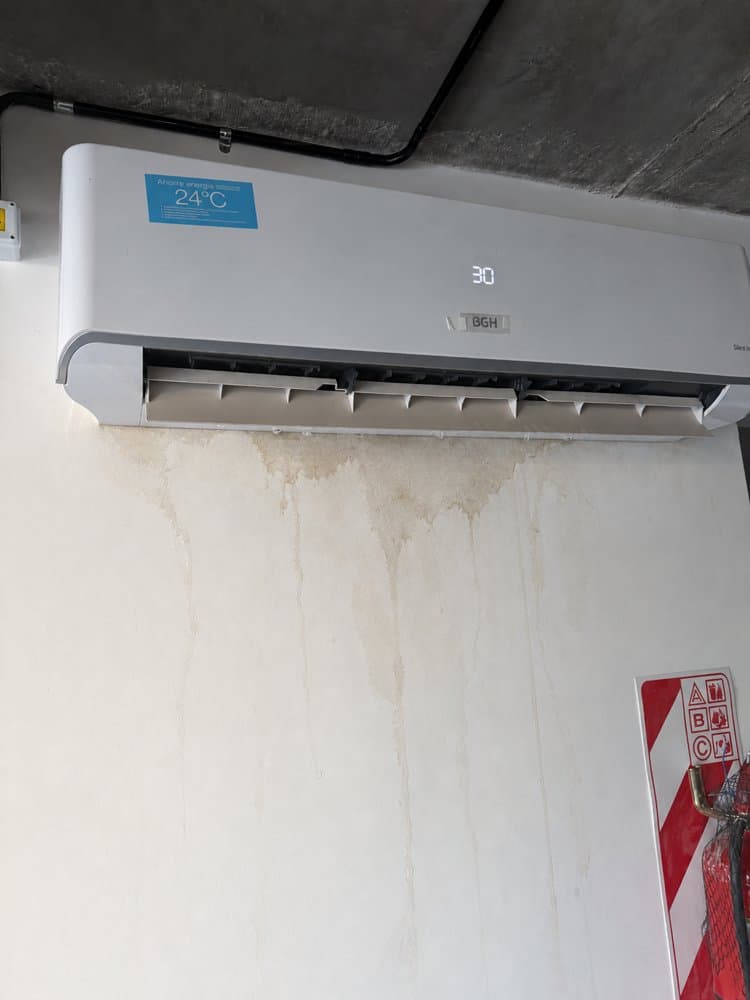
AI detected: the file declares it was edited with AI
Similar photo: it matches a photo already submitted in the same account
The edited photo tripped two checks on its own: AI detected, and a match with a photo already captured in the same account. The live capture was confirmed on location and showed a clean wall. If the claimant had been asked for a new photo through the link, there would have been no stain to show.
Verifying and certifying new photos at capture
Create a request and send the link through your own SMS, email or claims system. It opens in the phone browser, with nothing to install, and guides the policyholder through the photos you need. The link stays open for one week by default, and you can change that per request.
Each photo is checked as it is taken: device attestation, the location and time, signs of AI generation, and whether the camera is pointed at a screen. You also choose whether the policyholder can only shoot live or can upload photos too.
Every capture comes back with a verdict, Rial or Not Rial, with the checks that tripped, and a C2PA credential that any compatible viewer can read.
Link or native SDK
The browser link carries device attestation and a C2PA credential, and needs nothing installed. The native iOS and Android SDKs go one step further: they sign each photo with the phone’s secure hardware. Use the link to reach any policyholder today, and the SDKs inside your own app for the strongest guarantee. SDK access is granted within 24 hours of a request to developers@rial.io.
Where it fits
- 01
First notice of loss
Send the capture link with the claim acknowledgment, so the first photos in the file are verified ones.
- 02
After a fraud alert
When a score or a rule flags the claim, request new photos through the link instead of asking for more email attachments.
- 03
When a photo comes back Not Rial
Check which signal tripped, a photo of a screen or an AI-generated image, and send a new link for the same item before an adjuster spends time on it.
What it costs to start
Your first 5 photos are free. After that, credits come in packs of 50, 250 or 1000 photos for US$10, US$50 or US$200, with no monthly minimum. Larger carriers can start with a pilot.
Common questions
Can insurers tell if a claim photo was made with AI?
Sometimes. Detection tools return a probability, and they get weaker as image generators improve. A photo captured through a verified flow does not depend on spotting the fake: it records how, where and when the photo was taken.
Is editing a claim photo insurance fraud?
Submitting an altered photo to support a claim is generally treated as misrepresentation. What it means for a specific claim is a legal question for the carrier and its counsel.
What is a shallowfake in insurance claims?
A real photo with a small, targeted edit, such as added damage or a changed date. It is harder to spot than a fully generated image because most of the photo is genuine.
Can you check a photo that was already submitted?
Yes. Rial Audit checks photos you already have for signs of AI generation and searches stock and social sources for matches. It cannot prove where or when the photo was taken.
Does the policyholder need to install an app?
No. The capture link opens in the phone browser, with nothing to install and no account to create. If you have your own app, the native SDKs add a signature from the phone’s secure hardware.
Can the policyholder upload photos from their gallery?
You decide when you create the request: live capture only, or capture plus uploads. Uploaded photos get the same checks, without the guarantees of a live capture.
How long does the link stay open?
One week by default. You can set a shorter or longer window for each request.
What is C2PA, and does it prove a photo is real?
C2PA is an open standard that records who signed a file and what happened to it. On its own it does not prove the scene is real. Rial adds checks at capture: the device, the location and time, AI generation and photos of a screen.
Where the numbers come from
- Verisk, State of Insurance Fraud study (March 2026), as quoted in the Truepic and Verisk release
- SAS, synthetic images and insurance fraud (May 2026)
- Allianz UK, fraud prevention results (April 2024)
- Aviva, claims fraud in 2025 (June 2026)
- Debevoise, AI-generated images in insurance claims (January 2026)